
Note
19/7/2026: Generally updated.
29/1/2026: "gedit" changed to "micro".
11/10/2024: smtp setting revised.
23/1/2024: Minor changes.
26/3/2023: smtp setting revised.
16/12/2021: Updated installation command.
27/5/2019: Changed to use extracting directly to web directory. Protection measures added.
8/5/2019: All "/var/www/web" changed to "/var/www/html/web". "<version number>" used instead of a specific number. More descriptions on settings added.
25/12/2014: Created.
Intro
Roundcube is a webmail client.
Install Roundcube using apt
Execute:
$ sudo apt install roundcube
(Deleted, not working, 11/10/2024)
Install Roundcube from roundcube.net
If the apt installation does not work, execute to remove:
$ sudo apt remove roundcubeThen download roundcubemail-<version number>-complete.tar.gz by selecting "Complete: <version number>" at https://roundcube.net/download/, usually to own "Downloads" directory.
Extract the compressed file, move the extracted directory and files to underneath "/var/www/html", and rename the directory as "roundcube".
Ensure that the hidden ".htaccess" file is also moved.
A quicker way is to extract directly to "/var/www/html" and rename the directory there.
Install Roundcube under "/var/www/html":
$ cd /var/www/html$ sudo tar -xzfv /home/<own account name>/Downloads/roundcubemail-<version number>-complete.tar.gz (extract to current directory)$ tar -xzf /home/<own account name>/Downloads/roundcubemail-<version number>-complete.tar.gz (extract to current directory) $ ls (see the existence of the extracted directory) $sudomv roundcubemail-<version number> roundcube (change directory name) $ cd roundcube $ sudo chown www-data:www-data logs $ sudo chown www-data:www-data temp
"-xzfv" can be remembered as extract zipped file verbose. Use "-xzf" if "v" not working.
(changed to use "-xzf", added cd roundcube, 16/12/2021)
(changed to use "tar" directly to web directory, 27/5/2019)
Set up Roundcube
Install MySQL database + PHP + phpMyAdmin, if not already installed.
Login phpmyadmin at web browser:
https://localhost/phpmyadminCreate a database user "roundcube" with database "roundcube":
- click "Users" at the top menu bar
- click "Add user" at the page middle
- enter "roundcube" at the User name entry
- select "Local" for "localhost" at the Host entry
(Select "Local", not enter "local", 11/10/2024)
- enter and re-type the password
- click "Create database with same name and grant all privileges"
- click "Go" at the bottom
Enter at web browser:
https://localhost/roundcube/installerConfigure Roundcube:
- accept all of the defaults
- enter "localhost" as host
- enter database user "roundcube", database "roundcube" and password under Database setup
-
select spellcheck
(added, 19/7/2026)
- click: "CREATE CONFIG"
- download the configuration file generated and save it as config.inc.php
- move the downloaded file:
$ mv /home/<own account name>/Downloads/config.inc.php /var/www/html/roundcube/config- click: "CONTINUE" on the webpage
- check and test all items until they have all got "OK"
-
if the config is not correct to get "OK", adjust config.inc.php as necessary
(2 lines added, 19/7/2026)
-
click: "Initialize database" (this button will appear only if the database information is correct)
(revised, 19/7/2026)
-
set to use secure SMTP port 465 (i.e. set "localhost:465" as SMTP Host)(last line not working, changed to next line, 26/3/2023)
-
set "ssl://kctang.com.hk" as SMTP Host
(revised again, 11/10/2024)
- enter username and password, and sender and recipient full email addresses to test SMTP config
-
set "ssl://kctang.com.hk" as IMAP Host
(revised, 19/7/2026)
- enter username and password to test IMAP config
-
leave the page if all items have got "OK"
(added, 19/7/2026)
If installed from roundcube.net, remove or rename installer directory, and protect logs and temp directories:
$ sudo cd /var/www/html/roundcube
$ sudo rm -R installer                   (remove)
$ sudo mv installer installer.original   (or rename)
$ sudo chown -R $USER:$USER logs
$ sudo chown -R $USER:$USER temp
(revised to add protection, 27/5/2019)
Configure PHP5 only (not necessary for PHP7 and later):
$ sudo micro /etc/php5/apache2/php.ini- define:
date.timezone = Asia/Hong_Kongotherwise the date column of the web mail would be blank.
Edit Apache2 config:
$ sudo micro /etc/apache2/sites-available/000-default-le-ssl.confAdd lines to become the following:
ServerAdmin webmaster@localhost
DocumentRoot /var/www/html

<Directory /var/www/html/web>
    Options +FollowSymLinks
    AllowOverride All
    Require all granted
</Directory>

# Roundcube alias to handle entry point now at public_html, KCTang 19/7/2026
Alias /roundcube /var/www/html/roundcube/public_html
<Directory /var/www/html/roundcube/public_html>
    Options +FollowSymLinks
    AllowOverride All
    Require all granted
</Directory>
(added, 19/7/2026)
Restart Apache2 service:
$ sudo systemctl reload apache2
or
$ sudo service apache2 reload
Log in at web browser:
https://localhost/roundcubeor
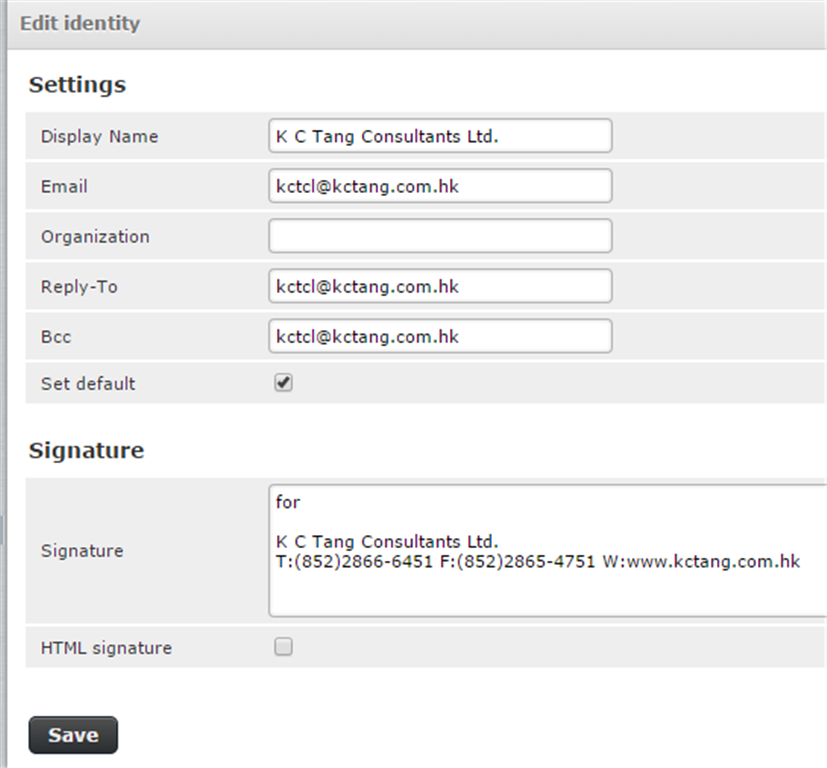
https://kctang.com.hk/roundcubeClick Settings > Identity to define some settings:
Click Settings > Preferences > User Interface
- Main Options
- Language: English (US)
- Time zone : Asia/Hong Kong
- Time format : 07:30
- Date format : 24/7/2023
- Save.
Click Settings > Preferences > Composing Messages
- Main Options
- Compose HTML messages : always
- When replying : start new message above the quote
- Signature Options
- Force standard separator in signatures : turn off
- Spellcheck Options
- Check spelling before sending a message : turn on
- Ignore words with symbols : turn on
- Ignore words with numbers : turn on
- Ignore words with all letters capitalised : turn on
- Advanced options
- Attachment names : Full RFC 2231 (Thunderbird)
- Save.
Click Settings > Contacts > Import to import contacts files, e.g. previously exported from Google.
(more descriptions on settings added, 8/5/2019)
(further added, 26/3/2023)
(further added, 19/7/2026)
Upgrade if installed from roundcube.net
Download and extract the subdirectory of the new version to "Downloads" directory as "roundcubemail-<new version number>".
Upgrade existing directory using the installto.sh script:
$ cd /home/<own account name>/Downloads/roundcubemail-<new version number>/bin
$ ./installto.sh /var/www/html/roundcube
In case of big trouble
Uninstall Roundcube:
$ sudo apt-get remove roundcubeRemove "/var/www/html/roundcube":
$ cd /var/www/html
$ sudo rm -r roundcube
Delete mySQL user "roundcube" and database "roundcube" using phpMyAdmin.
Intall Roundcube as new.